

Data Management Overview
Data management turns uploaded data into assets that are traceable, curatable, and ready for training. It has five parts:
| Module | Purpose | Where |
|---|---|---|
| Data Upload | Three upload modes (full, screened, segmented) and two storage formats (HDF5 and RAW) | Selected when creating a collection task |
| Data Assets | The master list of all ingested data, filtered first by collection task | Data Curation → Data Assets |
| Curation Projects | An editable workspace that references a set of data | Data Curation → Curation Projects |
| Data Workbench | Preview, label, trim, review, and batch-process data | Data Curation → Data Workbench |
| Datasets and Versions | Frozen snapshots exported from curation projects, used for training and delivery | Data Curation → Dataset Management |
How Data Flows
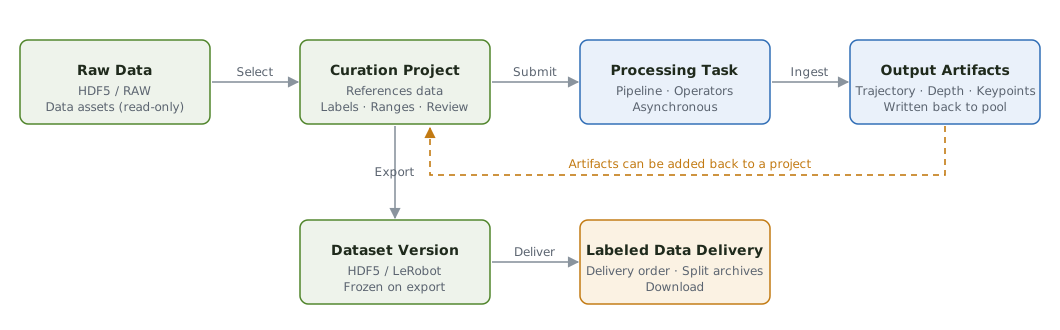
- Data that finishes uploading and passes integrity checks becomes a data asset with a permanent data ID.
- Select data assets to create a curation project.
- In the data workbench, flag quality issues, define keep and exclude ranges, and review each item. RAW data goes through a data pipeline first.
- When curation is complete, export a dataset version for training or delivery.
Data Curation
Curation in NexCore never alters source data:
| Action | What actually happens |
|---|---|
| Add a label | A metadata record is created |
| Mark an excluded range | An export instruction is recorded |
| Exclude an entire episode | An export instruction is recorded |
| Run a pipeline | New outputs are generated; the original data is kept |
| Export a dataset | New files are generated from the recorded instructions |
The original data stays unchanged after any action, so you can always return to it and curate again from scratch.
Data States
| State | Meaning | Can be added to a curation project? |
|---|---|---|
| Ready to Curate | HDF5 data, or outputs that have been through a pipeline | ✓ |
| Awaiting Pipeline | RAW data that hasn't been through a pipeline yet | ✗ |
| Validation Failed | Upload integrity checks did not pass | ✗ |
| Exported | Referenced by at least one dataset version | ✓ |
Isolation and Security
- Data is isolated by project; searches never return data from other projects.
- Exports, deletions, reviews, and similar actions record who performed them and when.
- Data is stored on the storage nodes in its region. A private deployment is available if data must stay on premises.