

Core Concepts
The key to understanding NexCore is understanding its objects and how data moves between them. This page defines the core terms used throughout the documentation.
Objects at a Glance
| Object | What it is | Created by | Mutability |
|---|---|---|---|
| Device | A collection or execution device registered in the device inventory, identified by model and serial number (SN) | Device registration | Name and status are editable; SN is not |
| Collection task | A task sheet that defines which device to use, how to upload, how many episodes to record, and who records them | FAE / R&D engineer | Device, SN, format, and upload mode are locked |
| Data asset | One uploaded and validated recording with a permanent data ID | Upload and ingestion | Read-only |
| Curation project | A workspace that references a set of data assets and records labels, ranges, and reviews | User | Continuously editable |
| Processing job | One pipeline run that processes project data with selected operators | User | Run record is retained |
| Annotated data | Data with structured annotations: quality labels, time ranges, trajectories, depth, keypoints, and more | Curation and pipelines | Updated through new versions |
| Dataset version | A frozen snapshot exported from a curation project, in HDF5 or LeRobot format | Export | Frozen and immutable |
| Training job | A single training run bound to dataset versions, a model family, and compute | User | Parameter snapshot is locked |
| Model | A model version produced by training, or a checkpoint model exported during training | Training job | Lineage fields are fixed |
| Deployment | A model version running on a cloud or edge node | User | Can be stopped or rolled back |
| Bad case | A failed segment from a run, with the failed node, step, and time range | Inference feedback | Can enter curation after review |
Data Side: From Raw Data to Datasets
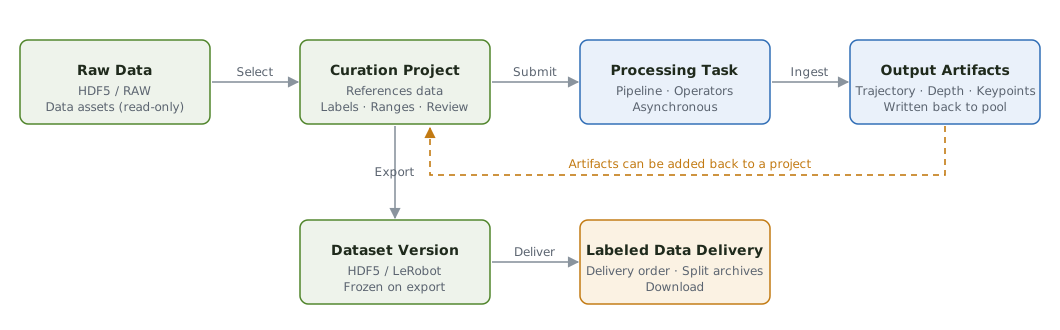
- Data assets are read-only. A curation project references data IDs; it never copies or modifies the original data. The same asset can be used in multiple projects.
- Processing jobs create new data. Pipeline outputs are written back to the asset pool and tagged with the processing job ID, while the original data is preserved. Outputs can be added to curation projects in turn.
- Datasets are snapshots. A curation project remains editable; each export creates a new dataset version and leaves earlier versions untouched.
- Annotated data can be delivered directly. Besides training, an exported dataset can be packaged and downloaded through a delivery order.
Two Storage Formats
| Storage format | Source | Curate directly? |
|---|---|---|
| HDF5 | Teleoperated robots: Station Lite, MOS | ✓ |
| RAW | Robot-free Ego, Robot-free UMI | After a pipeline run |
The storage format is determined by the device model and cannot be selected manually. The export format (HDF5 or LeRobot) is chosen when you export a dataset.
Model Side: From Datasets to Deployment
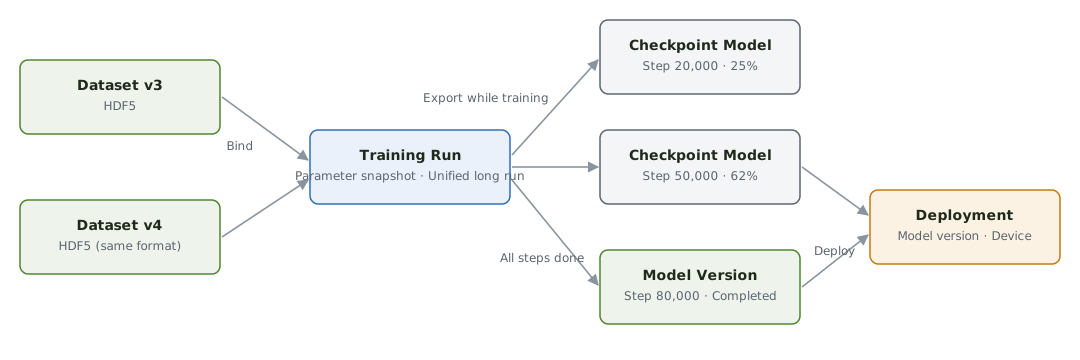
- Training jobs take dataset versions as input. You can select multiple versions in the same format; the parameter snapshot is locked on submission.
- One training job can produce multiple models. Checkpoints exported during training are registered as models, and a final model version is produced when training completes.
- Models are counted by version. Each model version records its training job, dataset versions, hyperparameter snapshot, and step count.
- Deployments run models on robots. A deployment record links to its model version, execution data flows back to the platform, and failure segments can be reviewed and returned to curation.
Accounts, Projects, and Roles
| Concept | Description |
|---|---|
| Account | Provisioned by an administrator; self-registration is not available |
| Project | The unit of business organization. Data is isolated by project, and an account can access only the projects it has been granted |
| Role | Administrator, FAE, data collector, R&D engineer, data owner, and so on. Determines which pages are visible and which actions are allowed |
See Accounts and Members and Roles and Permissions.
Terminology
The documentation uses these terms consistently:
| Use | Avoid |
|---|---|
| Dataset / dataset version | Training set, data package |
| Collection task | Personal task, collection order |
| Pipeline / processing job | Workflow task, pipeline task |
| Training job | Training run, training task |
| Model / model version | Weights package |
| Deployment | Go-live, push to device |
For the full list, see the Glossary.